Tame Noisy Conference Tables With Best USB Podcast Microphone
By Jakob Steiner • 21st Sep
Quick verdict
There is no universal best USB podcast microphone here. Choose by table layout: the MXL AC-404 suits a forward-facing 180-degree group and includes a headphone jack; the MXL AC-44 is the compact USB-C alternative with a line-level output; the Samson UB1 is the option here documented with an omnidirectional pattern rather than a 180-degree pickup specification.
- Choose the AC-404 if: Your group sits in a front-facing arc and you want a documented headphone jack plus plug-and-play computer use.
- Choose the AC-44 if: You need a compact USB-C microphone and a separate destination for line-level audio; its 3.5 mm output is not for headphones.
- Choose the UB1 if: Your seating is not a 180-degree forward-facing layout and an omnidirectional pattern is what you want to try.
Important: None of these models has been independently compared here for speech quality, table-noise rejection, echo, or room handling.
The best USB podcast microphone for a noisy conference table is not automatically the model with the widest reach - or the biggest specifications list. For conference table podcasting, the real decision is which documented pickup layout, connection, and output match your table. The three USB boundary microphones compared here can simplify a group setup, but none should be sold as a universal answer to room noise, table taps, echo, or inconsistent speaker level.
That distinction matters because a conference-table microphone is physically placed on the table as part of the session. Boundary microphones are commonly used on conference tables and tabletops in meeting rooms. The evidence here does not establish how any of these models performs when every speaker needs a consistent, intimate sound.
Minimum viable chain, maximum focus: choose the capture method that matches the conversation, then remove the obvious noise sources before pressing Record.
The problem: one microphone is being asked to do too much
A single USB boundary microphone seems like the clean answer to multi-speaker recording: place it on the table, connect it to a computer, and let everyone talk. That is a valid workflow when the priority is participation and intelligibility.
The trouble starts when pickup geometry is treated as proof of finished-recording performance. A boundary microphone table setup places the microphone on a surface as part of the seating layout. For the models here, the documented choices are 180-degree pickup or an omnidirectional pattern; those labels do not establish room performance.
A stated pickup range is not, by itself, proof of superior podcast sound. A frequency-response range does not establish superior podcast sound quality. And a polar-pattern label does not tell you how a specific room will sound in a finished episode. There is no controlled comparison here showing which of these microphones rejects more table vibration, room noise, or echo - or which produces the best podcast sound.
That absence is worth saying plainly. Do not substitute marketing geometry for a listening test in your room.
Why noisy tables make the shortcut expensive
The appeal of these USB table mics is understandable: direct computer connectivity and a camera-friendly table. But the available evidence does not establish how changes in speaker position affect level or tone for these models.
In a past muddy roundtable rescue, the microphones were not the culprit. The room was airy and the available gain was running out of clean headroom. We moved the chairs, tightened the usable speaking positions, added two gobos, and reset the gain structure. The sponsor reads stopped sounding distant, and the edit shifted from surgery to assembly.
That is the lesson for a USB conference-table setup: do not ask noise reduction to solve a layout problem it did not create.
Set expectations before choosing a boundary mic
Choose a table boundary microphone when these statements are true:
- You value a quick, unobtrusive shared setup.
- The session is a seated discussion in a meeting room.
- Participants can remain seated in a predictable layout.
- You can reduce avoidable noise before recording: silence phones, move laptops off the recording table where possible, and keep drinks, papers, and chair adjustments out of the performance.
Boundary microphones are commonly used on conference tables and tabletops in meeting rooms; for room-treatment planning, see this guide to an untreated room.

The solution: compare coverage, connection, and outputs - not hype
For this narrow category, the practical comparison is about three questions:
- Where will people sit? A semicircle and a full circle are materially different layouts.
- Which outputs do you need? A headphone jack and a line-level feed are different provisions.
- What is the computer connection? Direct USB connection, connector type, and cable routing affect whether a simple setup stays simple.
The products below have documented differences that can guide the choice. They do not establish a blanket ranking for voice quality in your room.
MXL AC-404: the better-defined choice for a front-facing table arc
The MXL AC-404 uses three capsules in a wide-cardioid design intended to cover a 180-degree arc, with a stated 25-foot pickup reach. That geometry makes sense when the conversation is arranged on one side of the microphone: a small panel facing a camera, a training table, or a seated group positioned in front of the unit rather than surrounding it.
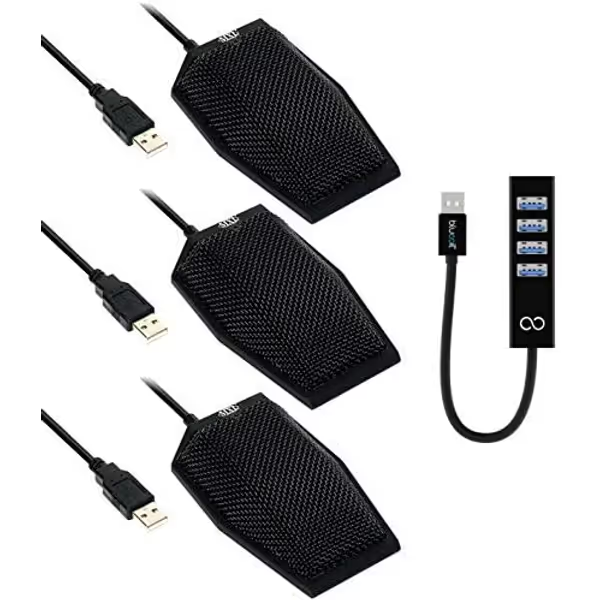
MXL AC-404 USB Conference Microphones (3-Pack)
Crystal-clear speech capture across the room for effortless group communication.
5
Pickup Range25 feet
Pickup Range25 feet
Pros
Captures voices clearly from across large rooms.
Automatic gain ensures consistent, intelligible audio.
Instant plug-and-play setup with PC/Mac and web conferencing software.
Cons
Boundary design may not suit all desk layouts.
Customers praise excellent pickup range, even at a distance, and durable build for hybrid meetings.
Customers praise excellent pickup range, even at a distance, and durable build for hybrid meetings.
Its published 40 Hz to 16 kHz response does not tell us whether it will sound better than the alternatives, so resist that leap. Its more concrete documented distinction is the included headphone jack. It also supports plug-and-play use with Windows and Macintosh computers without special drivers.
There is one chain-discipline detail that is easy to miss: MXL recommends connecting the AC-404 directly to the computer's USB port because hubs can interfere with USB-device performance. That matters because the available bundle includes a hub. Treat the hub as a convenience accessory, not a reason to disregard the manufacturer's direct-connection guidance.
Pick the AC-404 when: your participants occupy a forward-facing half-circle or one side of a table, and your setup calls for a headphone jack.
Pass when: you need everyone gathered around all sides of one microphone, or you expect its broad stated reach to replace controlled seating and a quieter room.
Do not confuse a broader specification with a stronger recording plan
The MXL AC-404 and MXL AC-44 both specify a 180-degree pickup concept with a stated 25-foot range. That is useful for mapping a seating layout, but it should not be read as a recommendation to spread voices across a long, reflective room. “Within range” is not the same as “matched for podcast tone.”
Keep the discussion compact. Place the microphone where the group geometry fits its pickup arc, not where it is easiest to hide. Then run a full-volume rehearsal with the loudest natural speaker. Listen on headphones for chair movement and the noise floor during pauses. If the raw capture is already distracting, moving the microphone a few inches is often more productive than stacking processing afterward.
Capture clean, commit early, and keep sponsors breathing between words.
MXL AC-44: compact USB-C with a line-level feed
The MXL AC-44 is a small, three-boundary-design USB-C microphone measuring 3 by 2.5 by 1 inches. It specifies 180-degree pickup with a stated 25-foot (7.62 m) range, a 30 Hz to 20 kHz response, and 48 kHz operation. Its compact footprint can be attractive when the microphone must stay discreet on camera or leave room for notes and laptops.
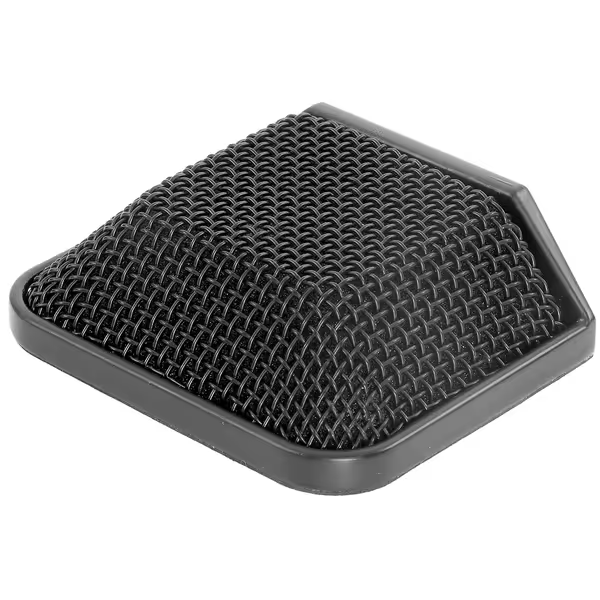
MXL AC-44 USB Boundary Microphone
Captures clear direct sound, minimizes room noise for optimal audio.
$54.95
0Capsule DesignThree-capsule Boundary
Capsule DesignThree-capsule Boundary
Pros
Reduces room echo and background noise effectively.
Flexible placement with wide pickup arc.
Plug-and-play USB-C for all devices.
Low-profile, durable all-metal design.
Cons
No USB-C to C cable included.
The important output caveat is that the AC-44 has a 3.5 mm line-level direct-feed output, but that output is not intended for headphones. This is not a defect; it is simply a different routing provision. If your equipment list requires a documented headphone jack, the AC-404 has one. If you have a separate destination for a line-level feed, the AC-44 provides one.
Its manual contains conflicting bit-depth language, so I would not make bit depth the deciding specification here. The more decisive factors are its small physical footprint, USB-C connection, 180-degree seating layout, and the fact that its analog output is line level rather than a headphone output.
Pick the AC-44 when: a low-profile USB-C boundary mic and a line-level feed suit the production chain, and the group sits within a forward-facing 180-degree layout.
Pass when: you need dedicated headphone monitoring directly from the microphone or need evidence that it handles table noise better than another option. That evidence is not established.
When an omnidirectional microphone is the honest fit
Some tables are not panels; they are actual roundtables. For sessions with multiple hosts, review this guide to multi-host podcast setups while planning the seating layout. If participants sit around the microphone rather than in front of it, the UB1 is the model in this comparison documented with an omnidirectional pattern, while the MXL models specify 180-degree pickup.
The UB1's omnidirectional pattern is its documented specification. The available evidence does not establish how the UB1 performs in a loud, reflective space.
Samson UB1: the layout-led option for all-around conversation
The Samson UB1 is an omnidirectional USB boundary microphone. It records 16-bit audio at 44.1 or 48 kHz and is listed as class-compliant, plug-and-play with Mac and Windows. It can sit on a conference table or be mounted using its keyhole mounting points; a 10-foot USB cable is listed with the product.
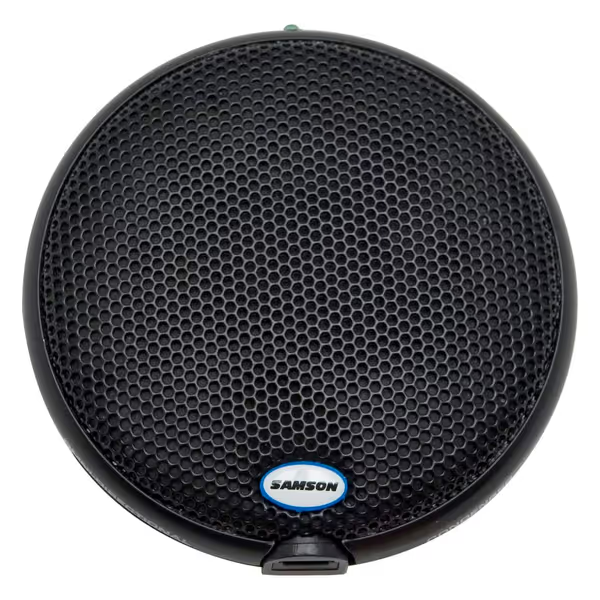
SAMSON UB1 USB Boundary Microphone
Effortless, clear audio capture for meetings and podcasts, no setup fuss.
$99.97
ConnectivityUSB Plug-and-Play
ConnectivityUSB Plug-and-Play
Pros
Instant setup on Mac/PC for quick recording.
Low-profile design is discreet on-camera or tabletop.
Omni-directional captures all voices in a room.
Cons
Lower sensitivity may require careful input level management.
Customers praise its sensitivity, clarity, and ease of use for teleconferencing and recording in various settings. Some users note that the sensitivity is lower than desired, requiring attention to input levels.
Customers praise its sensitivity, clarity, and ease of use for teleconferencing and recording in various settings. Some users note that the sensitivity is lower than desired, requiring attention to input levels.
For a table that is not arranged as a front-facing 180-degree group, the UB1 offers the documented omnidirectional-pattern alternative among these three. The recommendation is about the listed pattern, not a claim that it is quieter, clearer, or more podcast-ready than the MXL models. No controlled comparison establishes that.
Pick the UB1 when: speakers are not arranged in a forward-facing 180-degree layout and you want the UB1's documented omnidirectional pattern in one USB boundary microphone.
Pass when: its omnidirectional pattern does not match your seating plan.
The skeptical buying decision
Here is the honest shortlist:
- MXL AC-404: choose it for a forward-facing 180-degree group layout when a headphone jack is useful. Connect directly to the computer as MXL recommends.
- MXL AC-44: choose it for a compact USB-C, forward-facing setup when its line-level output fits an existing signal path. Do not buy it expecting a headphone output.
- Samson UB1: consider it when the seating pattern is not a forward-facing 180-degree group and its omnidirectional pattern is the requirement.
If you are searching for a dynamic cardioid microphone for close, isolated podcast voices, this comparison does not evaluate those microphones. This comparison covers the documented features of USB boundary microphones for shared-table capture.
A fast pre-record checklist for cleaner table audio
Before every session:
- Choose the seating geometry first. Use the 180-degree MXL models for a front-facing arc; for other seating layouts, consider whether the UB1's documented omnidirectional pattern fits the plan.
- Make the table boring. Remove loose objects and agree that tapping, shuffling, and laptop typing are off-mic activities.
- Control the room's behavior. Shut down or relocate obvious noise sources where practical; add soft furnishings or gobos if you have them.
- Confirm output requirements. The AC-404 includes a headphone jack. With the AC-44, use an appropriate separate destination for its line-level feed rather than treating it as a headphone port.
- Record a rehearsal, then listen to silence. The pauses reveal HVAC, computer fans, distant traffic, and the noise floor better than speech does.
- Keep people in position. A reliable seat and repeatable speaking posture are more valuable than a heroic repair pass afterward.
Further exploration: test the room before you commit
There is no responsible universal winner for "best USB podcast microphone" in this category. The best fit is the microphone whose pickup layout matches your table - and whose compromises you can hear and accept before recording a season of episodes.
Make a two-minute test in your actual room: normal conversation, a sponsor-read voice, a deliberate table tap, and ten seconds of silence. Compare that raw capture through your normal listening setup. If it already sounds controlled, intelligible, and usable without aggressive correction, you are on the right path. If it sounds roomy or unstable, change the seating and room before buying more processing.
That is how you build a repeatable conference-table workflow: clean gain where available, disciplined placement, minimal distractions, and a capture that remains fixable instead of fatal.
Related Articles