All in One Podcast Microphone Headset Bundles for Beginners
By Luis Cabrera • 29th Sep
What to do
Start by defining your recording route and room needs, then check whether the Zoom ZDM-1 Podcast Mic Pack’s included microphone, headphones, stand, windscreen, and XLR cable fit that plan.
- Start with: Decide whether you need a direct computer workflow, an XLR-based setup, or a compact desk arrangement before comparing bundles.
- Then: Use the included dynamic microphone, closed-back headphones, tabletop stand, windscreen, and cable for a short test in your normal recording space.
- Important prerequisite: Verify how the microphone’s XLR output connects to your computer, recorder, or other recording destination; the listed pack information does not establish that path.
Important: The article does not independently test sound quality, ease of use, or durability, so treat the specifications as fit information rather than a guarantee of results.
A podcast microphone bundle can make a beginner podcast setup feel far less intimidating: one purchase, fewer compatibility questions, and a microphone, headphones, and basic positioning gear that belong together. But "all in one" deserves a careful reading. The Zoom ZDM-1 Podcast Mic Pack combines several useful physical pieces, while the available product information does not establish a complete recording route to a computer or recorder. That distinction is exactly how you avoid buying a promising box today and discovering an unanswered workflow question tomorrow.
This step-by-step guide reviews the Zoom ZDM-1 Podcast Mic Pack as a practical podcasting equipment bundle for a solo beginner, then shows how to decide whether its included parts fit your room reality and recording plan. The goal is not to chase the trend of the month. It is to buy steps, not regrets.
Step 1: Define What "Easy Podcast Setup" Means for You
Before comparing a headphones and mic combo, write down the one job your first setup must do:
- Record a solo voice at a desk
- Record interviews in a shared home office
- Stream or make video lessons
- Build toward a more flexible XLR-based setup over time
- Travel with a compact kit
That list matters because a bundle can be complete in one sense and incomplete in another. A simple beginner checklist identifies three core needs: a microphone, a way to connect it to a computer (either directly by USB or through an interface), and a way to position the microphone. The Zoom pack clearly addresses the microphone and positioning portions, and it also includes headphones. The bundle listing identifies a ZDM-1 dynamic microphone, ZHP-1 headphones, TPS-4 tabletop stand, windscreen, and XLR cable. For a closer look at items such as windscreens, stands, and other podcast mic accessories, review the accessory guide before deciding whether this bundle is complete for your needs.
The microphone itself is listed with an XLRM output connector. That tells you to pause before assuming how it fits into your computer or recorder setup. Confirm the complete connection path to your computer, recorder, or software before purchasing. Check the current manuals and the equipment you plan to record with before purchasing.
A bundle is good value only when its included pieces solve problems you actually have.
This is where I see beginners spend twice: first on something that looks simple, then again on a replacement once their recording path becomes clear. Sequence upgrades so each piece keeps earning its place.
Step 2: Meet the Zoom ZDM-1 Podcast Mic Pack
The Zoom ZDM-1 Podcast Mic Pack is model ZDM-1PMP. Its listed components are focused on a microphone, headphones, a small tabletop stand, a windscreen, and an XLR cable. In other words, the listing identifies a microphone and headphone set alongside the supporting accessories.
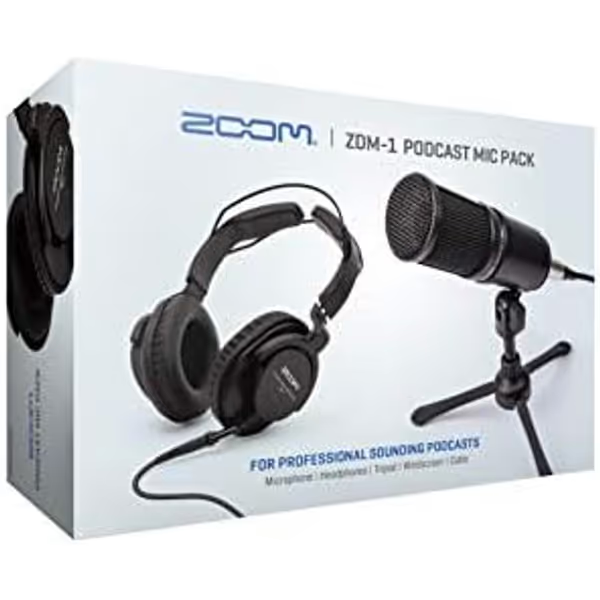
Zoom ZDM-1 Podcast Mic Pack
Everything you need to record professional podcasts right out of the box.
Mic TypeDynamic
Mic TypeDynamic
Pros
Full kit for instant podcasting success
Dynamic mic optimizes voice, reduces room noise
Closed-back headphones for clear monitoring
Cons
USB interface not included for direct computer connection
What is included
Here is the bundle inventory and why each item belongs in a first-purchase conversation:
| Included item | What the listing establishes | Why it matters when choosing a bundle |
|---|---|---|
| Zoom ZDM-1 | Dynamic microphone | The core voice-capture component |
| ZHP-1 | Headphones | Headphones included in the pack |
| TPS-4 | Tabletop microphone stand | A listed tabletop microphone stand |
| Windscreen | Windscreen | A fitted accessory included in the box |
| XLR cable | XLR cable | A listed cable matching the microphone’s XLRM connector format |
Operation manuals are available for both the ZDM-1 microphone and ZHP-1 headphones. That is worth more than it sounds at the beginner stage. Read those documents before your first session, especially if a non-technical colleague will use the kit after you.
The mic and headphone specifications worth knowing
Published specifications describe the included ZDM-1 as a dynamic microphone with a supercardioid polar pattern, a 50-18,000 Hz frequency response, and an XLRM connector. The ZHP-1 headphones are listed as dynamic, closed-back headphones with a 10-20,000 Hz frequency response.
Those numbers do not tell you whether your particular voice will sound "warm," whether desk vibration will be audible, or how much gain your eventual recording chain will require. I have not run an independent hands-on comparison of this exact pack, so I would not oversell it as universally ideal, broadcast-ready, or the best podcast microphone. Treat the specifications as a starting point for fit, not a guarantee about your raw audio.
Step 3: Decide Whether a Dynamic, Supercardioid Mic Fits Your Room Reality
If your room has computer fans, hard walls, traffic noise, or other activity beyond your desk, microphone type becomes a sensible first filter. Podcast practitioner Bren Russell's guidance is that dynamic microphones emphasize the area nearest the microphone and reject much of the surrounding activity. That is practitioner advice, not a test of the ZDM-1 specifically, and not a rule that overrides placement or room conditions, but it explains why a dynamic mic can be an appealing direction for many home-recording beginners.
The ZDM-1's supercardioid pattern is also a reason to plan your desk arrangement rather than simply placing the mic wherever it fits on camera. Learn the intended orientation from the ZDM-1 manual, then test a short spoken clip while the normal room noises are present. Do not judge from a silent midnight test if you record at lunchtime beside an HVAC vent.
A five-minute pre-purchase reality check
Ask yourself these questions:
- Can I keep the microphone near my speaking position? A dynamic microphone is not a magic substitute for room acoustics; placement still matters.
- Will a tabletop stand work on my desk? Measure the usable desk surface and think about keyboard, mouse, and monitor placement.
- Do I need an on-camera setup? Consider your camera framing and desk height when evaluating a tabletop stand.
- What will receive the XLRM-output microphone? Confirm the exact path you intend to use for recording rather than assuming one from the bundle description.
- How will I use headphones in my recording plan? The included ZHP-1 headphones are listed as closed-back.
A student newsroom once gave me a shoebox of mismatched mounts and one creaky arm. The win was not a glamorous gear list; it was choosing hardware that could be reused while the recording plan grew. That same principle applies here: the included stand and cable have value when they match the way you will actually work.
Step 4: Compare the Pack Against Two Other Buying Paths
There is only one product in this review, so the most honest comparison is not against invented rivals. If you want a direct comparison of complete beginner packages, see this budget podcast bundle comparison alongside the single-product evaluation here. It is against the two purchase paths a beginner genuinely faces.
Path A: Buy a USB microphone separately
A USB route may suit a creator whose priority is a direct computer-oriented workflow. The ZDM-1 is listed with an XLRM output connector, so confirm how that connector fits your intended setup rather than assuming it will work like a direct-computer microphone. If direct computer connection is your non-negotiable requirement, verify the whole connection path before you commit.
The trade-off is that buying individually means choosing the microphone, headphones, stand, and any other components separately.
Path B: Buy the Zoom ZDM-1 Podcast Mic Pack
The Zoom bundle gives you a defined group of five listed item types: a dynamic microphone, closed-back headphones, tabletop stand, windscreen, and XLR cable. That is its central bundle value. You do not have to select each of those listed component types separately on day one.
The trade-off is not necessarily a flaw; it is a planning responsibility. The collected product information does not establish a complete recording route, so verify your intended destination (computer, recorder, or another device) with current documentation before purchase.
The practical comparison
| If this is your priority | More sensible direction |
|---|---|
| A fully confirmed direct-to-computer workflow | Evaluate products whose current documentation explicitly describes that workflow |
| One matched set of mic, headphones, tabletop stand, windscreen, and cable | The Zoom ZDM-1 Podcast Mic Pack is the more focused bundle option |
| A purchase that leaves you room to learn an XLR-based workflow | The ZDM-1's listed XLRM output makes this worth evaluating, after you confirm the rest of your chain |
| Adding multiple hosts immediately | Plan each person’s microphone, monitoring, positioning, and recording path before multiplying purchases |
Step 5: Calculate Value Without Guessing at the Total Cost of Setup
I am strict about total cost of setup, and I will not guess. As of September 29, 2026, Hot Rod Cameras listed an open-box ZDM-1PMP-OB at $73.59 with one unit in stock. That is a seller-specific, condition-specific listing, not a new-product list price or a promise of present availability.
So evaluate the pack in two columns.
Value that is visible in the box
- ZDM-1 dynamic microphone
- ZHP-1 closed-back headphones
- TPS-4 tabletop stand
- Windscreen
- XLR cable
Questions to price and verify for your own workflow
- Where will your recording be captured?
- If you plan to record to a computer, recorder, or another device, how will that destination work with the ZDM-1's listed XLRM output?
- What software or recording method will you use?
- Does your desk arrangement make the tabletop stand practical?
- Do you anticipate changing the physical mount later?
The listing establishes the physical component types above, but it does not establish the complete workflow for your particular recording plan. A creator who can answer those questions has a better chance of turning a bundle into an easy podcast setup instead of a paused project.
Step 6: Use a Low-Regret First-Session Checklist
Once you have checked the current documentation and your recording route, keep the first session deliberately small:
- Unpack only the parts you will use for one spoken-voice test.
- Place the tabletop stand where it leaves room for your normal keyboard and notes.
- Consult the ZDM-1 and ZHP-1 manuals before use.
- Connect components only according to the instructions for your confirmed recording destination.
- Record a short sample in the same room, at the same time of day, where you will make episodes.
- Speak naturally, then listen on the included headphones for room sound, plosives, breath sounds, desk noise, and comfort.
- Change one variable at a time using these microphone positioning techniques, and record another brief sample.
The purpose is not to create a laboratory test. It is to hear your normal voice in your normal room before you build a whole publishing schedule around it.
FAQ
What type of mic is best for podcasting?
There is no universally best type for every voice, room, and workflow. The Zoom ZDM-1 is listed as a dynamic microphone. One podcast practitioner argues that dynamics can be a sensible choice in many untreated home spaces because they focus on the nearby speaking area and reject much surrounding activity. Use that as a direction to investigate, not a universal verdict.
How much does a podcast mic cost?
There is no single market price. Here is one condition-specific example: as of September 29, 2026, Hot Rod Cameras listed an open-box Zoom ZDM-1 Podcast Mic Pack for $73.59 with one unit in stock. Check current seller pricing and product condition before treating any figure as your budget.
How much money is needed to start a podcast?
The minimum depends on your recording method and what you already own. A beginner checklist identifies a microphone, a connection to a computer, and a means of positioning the microphone as core elements. The Zoom pack supplies the microphone and positioning gear listed above, plus headphones, cable, and windscreen; confirm your own recording destination and workflow from current documentation rather than assuming one fixed all-in cost.
Summary and Final Verdict
The Zoom ZDM-1 Podcast Mic Pack is worth a close look if you want a coherent first bundle centered on a dynamic microphone with a supercardioid pattern, closed-back headphones, a tabletop stand, a windscreen, and an XLR cable. Its strongest case is convenience through included physical essentials, not unsupported promises about universal sound quality or a guaranteed computer-recording workflow.
My final verdict: choose it when you value the listed accessory set and have checked how the ZDM-1's XLRM output fits your intended recording destination. If a direct, explicitly documented computer workflow is your first requirement, confirm that requirement before buying any bundle.
That is the frugal path: start with what you can use now, protect what you may reuse later, and buy steps, not regrets.
Related Articles